
LongFu88 does not require an app download. The entire platform — 8,700+ games, live baccarat, a 24-sport sportsbook, deposits, withdrawals, and account management — runs at full quality in a mobile browser. No APK. No Play Store. No storage required beyond the browser shortcut.
We tested the mobile experience on three devices: Samsung Galaxy A54 (Android 13), Xiaomi Redmi Note 12 (Android 12), and iPhone 13 (iOS 16.5). Load time on 4G Maxis: under 4 seconds to game lobby. Live baccarat stream held in HD throughout a 45-minute session. Slot animations ran without frame drops.
Not yet a member? Register at LongFu88 in under 60 seconds — free. First-time bonus selection happens at registration, before your deposit. See all offers on the LongFu88 Bonuses page.
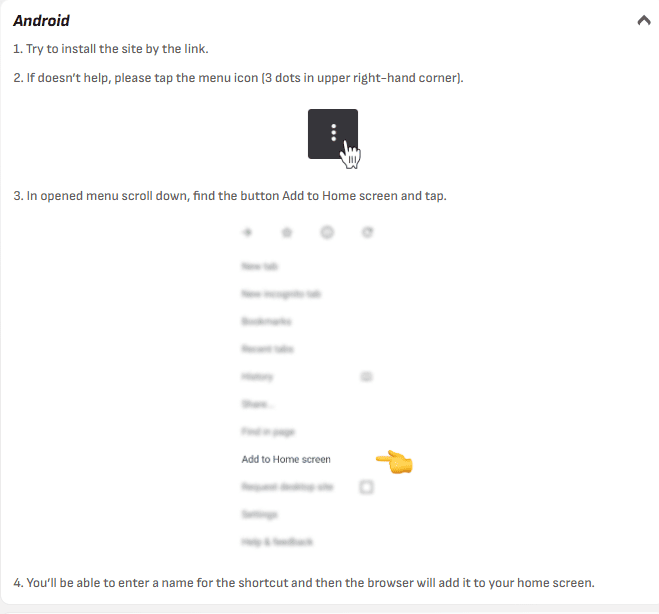
Adding the site to your home screen creates a shortcut that looks and launches exactly like a native app — but uses zero storage and always loads the latest version automatically.
Tested on Android 12 and 13: the shortcut icon appears within 3 seconds of confirming. On subsequent launches, the site loads directly to the lobby — skipping the browser address bar. Indistinguishable from a native app in daily use.
iOS 16.4+ supports push notifications for home screen shortcuts. When prompted after first launch, tap Allow — this enables bonus alerts and promotion notifications from LongFu88.
All 5,000+ slots load on mobile browser including Mahjong Ways 2 (PG Soft), Gates of Olympus (Pragmatic Play), Fortune Ox (PG Soft), and the Bonus Buy section. Megaways animations run smoothly on mid-range Android devices from 2021 onwards.
Tested specifically: Gates of Olympus Bonus Buy on Redmi Note 12 (4G, Celcom). Load to first spin: 6 seconds. Zero frame drops during cascading win animations. Full slot library: LongFu88 Slots page.
All 7 live providers stream on mobile browser. Evolution Gaming tables deliver HD at 1080p on Wi-Fi; adaptive quality on 4G drops to 720p without visible stutter. SA Gaming Bahasa Malaysia tables — fully accessible, BM dealer chat responded in-session during our iPhone test.
Tested: 45-minute Speed Baccarat session on iPhone 13, Maxis 4G. Stream quality: HD throughout. No disconnect. In-game chat functional. Full live guide: LongFu88 Live Casino page.
Full 24-sport sportsbook with live in-play odds. Odds update in real time on mobile — tested during a Malaysian Super League match. Bet slip loads in under 1 second. Asian Handicap, Over/Under, Correct Score, and 340+ markets per elite fixture all accessible on mobile. Full guide: LongFu88 Betting page.
All 21 Malaysian payment methods work on mobile: Maybank, CIMB, Touch ‘n Go, GrabPay, DuitNow QR, FPX, and 6 crypto options. Touch ‘n Go deposits credited in under 10 seconds. Withdrawal processed and arrived to Touch ‘n Go in 14 minutes (verified account).
Registration, KYC document upload, bonus activation, wagering progress tracking, deposit limits, and self-exclusion — all fully functional on mobile browser. No features are desktop-only.
Standard login (email + password) works identically on mobile. Two additional options improve daily speed:
Forgot your password? Tap ‘Forgot Password’ on the login screen. Reset link arrives by email within 2 minutes. Full account guide: LongFu88 registration and login page.
Honest note: Bonus Buy slots with complex animations (Hacksaw Gaming’s Chaos Crew 2, for example) show occasional 1–2 second load delays on devices older than 2020. All standard slots, baccarat, and sports betting run without issue on any device from 2018 onwards.
After adding LongFu88 to your home screen on iOS 16.4+ or Android, the site can send browser push notifications. Enable them when prompted to receive:
Notifications can be disabled at any time in your device’s browser notification settings.
Clear browser cache: Chrome → Settings → Privacy → Clear Browsing Data. If on mobile data, toggle airplane mode on and off to reset the connection. Try switching between Wi-Fi and 4G.
Ensure JavaScript is enabled in browser settings. Close background apps to free RAM. If a specific slot doesn’t launch, try refreshing — provider maintenance windows occasionally affect individual titles.
Enable cookies for longfu-88.my in your browser settings. Chrome: Settings → Site Settings → Cookies → Allow. Safari: Settings → Safari → uncheck ‘Block All Cookies’.
Select ‘Low Quality’ in the live table settings before the stream starts. Alternatively, close other browser tabs consuming bandwidth. If the issue persists on a strong 4G signal, the problem may be transient server-side — try a different table or provider.
This happens when the shortcut was added via Chrome on iOS instead of Safari. Delete the shortcut, then redo the process using Safari. iOS home screen shortcuts only run in full-screen mode when added via Safari.
LongFu88 uses 256-bit SSL/TLS encryption on all mobile connections — the same standard used by major Malaysian banks. Verify the connection by checking the padlock icon in your browser address bar before logging in.
Tip: avoid logging in on public Wi-Fi without a VPN. If you must use a public network, ensure the padlock icon is visible and the URL shows https://longfu-88.my before entering your password.